
Imagine you’re designing your dream home. Every detail matters, from the placement of rooms to the way natural light flows through each space.
Windows play a crucial role in bringing your vision to life. Drawing windows on a floor plan isn’t just about technical accuracy; it’s about creating a space that feels open, inviting, and perfectly tailored to your needs. By understanding how to properly position and represent windows on your floor plan, you can transform your home’s atmosphere, ensuring it feels just right.
In this guide, you’ll discover straightforward techniques to master this essential aspect of home design. Ready to unlock the secrets to drawing windows that enhance your living space? Let’s dive in and explore the steps that will turn your blueprint into reality.
Materials And Tools
Paper is important for drawing plans. Graph paper helps with measurements. Pencils must be sharp for clear lines. Erasers fix mistakes easily. Rulers make straight lines. Templates can show window shapes. Drawing boards keep paper steady.
Computer software makes drawing easy. CAD programs are popular choices. They help with accurate measurements. Tablets are good for sketching ideas. Stylus pens work well on tablets. Digital rulers help with straight lines. Cloud storage keeps plans safe.
Understanding Window Types
Casement windows open like a door. They have hinges on one side. You can open them wide to let fresh air in. These windows are great for airflow. They are easy to clean from inside. You can use them in places hard to reach.
Sliding windows move side to side. They have tracks that help them slide. These windows save space. No swinging doors to worry about. They are perfect for small rooms. You can often see them in basements or bathrooms.
Bay and bow windows stick out from walls. They create a little nook inside. More light comes in through these windows. They make rooms look bigger. Many people place seats or plants by them. They are a charming feature in any home.
Placement And Proportion
Windows need careful placement on a floor plan. They let light in and allow fresh air. Think about where the sun shines. Too much sun can make a room hot. Not enough can make it dark. Look at the room’s function. Kitchen windows might face a garden. Bedroom windows can overlook a quiet area. Balance is key. Too many windows might weaken walls. Too few can make spaces gloomy. Use symmetry for a pleasing look. Windows on opposite walls can help air flow. Remember, privacy matters too. Avoid placing them near bathrooms.
Windows should fit the room’s scale. Big rooms need bigger windows. Small spaces need smaller ones. Draw windows to match wall size. Use a ruler for accuracy. Keep proportions consistent. If one window is tall, others should be too. Floor plans need balance. Avoid giant windows in tiny rooms. It can look odd. Make sure windows are not too small. They should let in enough light. Measure carefully and think about wall space. Proportions help create harmony in designs.

Drawing Techniques
Graph paper helps keep lines straight. The grid makes it easy. Count squares for size. This keeps windows the same size. Accuracy matters for the final plan. Use a ruler for neat lines. Measure each window carefully. Count again to check sizes. Mistakes can happen. Erase and fix them right away. Pencils are best. They erase easily.
Digital tools make drawing fun. Use a tablet or computer. Software can help. It has many tools for lines and shapes. Undo mistakes quickly. Zoom in to see details. Save your work often. Layers help organize different parts. Practice using these tools. They make drawing neat. Guidelines can help with placement. Colors show different things. Blue for windows, red for doors.
Incorporating Architectural Styles
Traditional windows often have elegant frames and detailed trims. They bring a classic look to any building. Modern designs use simple lines and large glass panels. These windows offer more light and a clean appearance. Choose the style that fits your building’s overall theme.
Windows should match the building style. A cozy cottage needs small, charming windows. A city skyscraper uses tall, sleek windows. Matching windows create a harmonious look. This makes the building feel more complete. Think about how windows affect the building’s feel. Choose wisely for the best effect.
Common Mistakes
Many people draw windows in the wrong place. This makes the plan look strange. Misaligned windows can cause problems. They might not fit well with the walls. This can make the room feel uneven. It’s important to check the window’s position. Use a ruler or a grid for help. This makes sure everything is in the right spot.
Always keep the right size for windows. Big windows on a small wall look odd. Small windows on big walls look weird too. Use a scale ruler. This helps keep sizes the same everywhere. Check your work often. Make sure every window matches the plan’s scale.
Tips From Professionals
Architects know how to draw windows on plans. They use simple steps. First, they decide the location. Windows should bring in light. Next, they check the size. Big windows let in more air. Small windows give privacy.
Architects also think about the style. Some homes need modern windows. Others need classic ones. They also measure carefully. Accurate drawings help builders. Mistakes can cause problems.
Many architects use symbols for windows. These symbols are easy to read. They show the type and size. Using symbols saves time. It also reduces errors. Builders can understand plans quickly.
Another practice is labeling. Architects label each window. Labels provide important details. Such as size, type, and materials. These practices make sure homes are built right.


Frequently Asked Questions
How Do You Represent Windows On A Floor Plan?
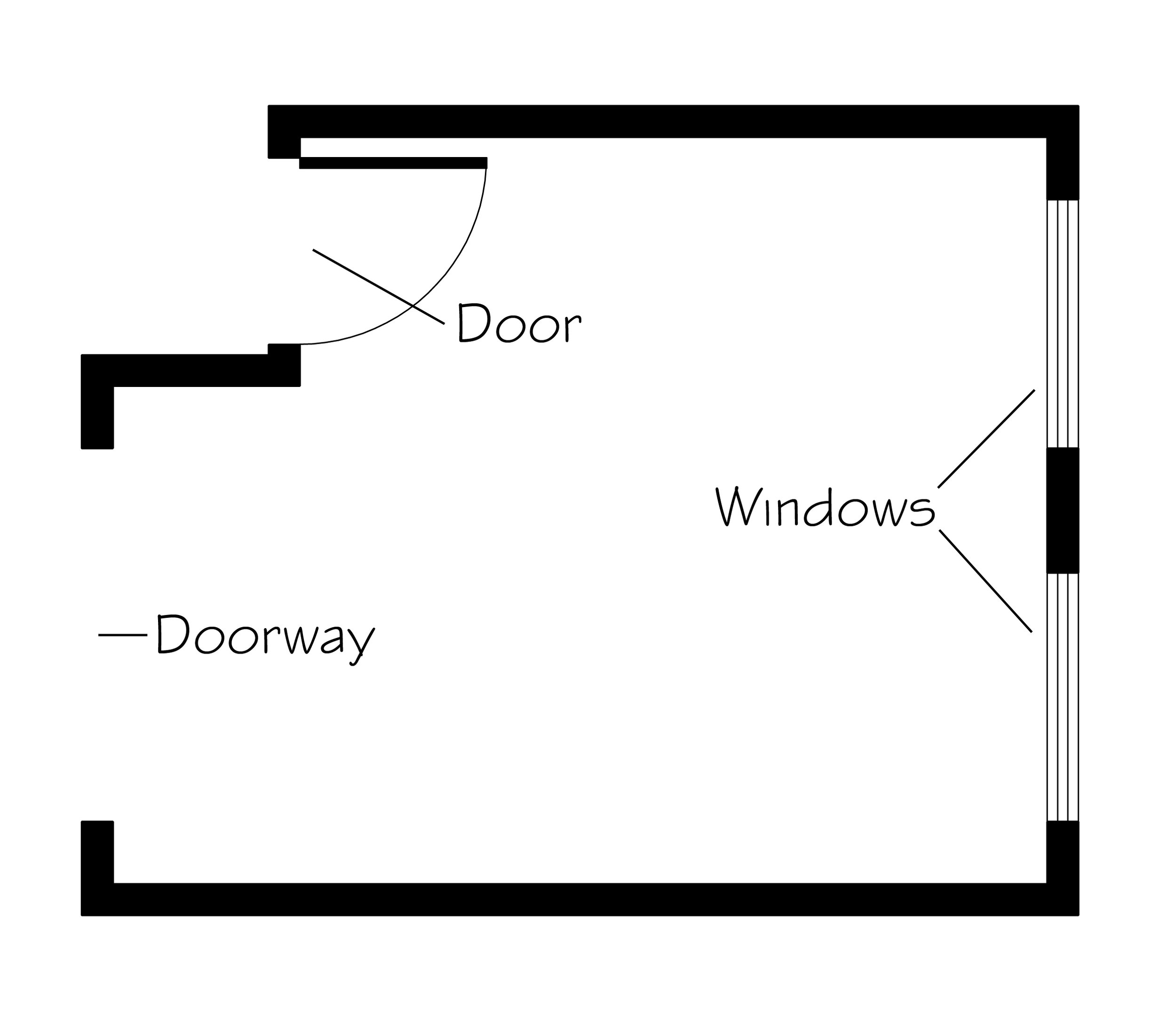
To represent windows on a floor plan, use thin lines along the wall. They often have a break in the wall line. Windows are usually shown as a narrow rectangle. Ensure the size and type match your design specifications. This depiction helps visualize the window placement in the room.
What Tools Do I Need To Draw Windows?
You need a ruler, pencil, and drafting paper for manual drawing. For digital designs, use software like AutoCAD or SketchUp. These tools help create accurate and clean window representations. Ensure you have the necessary measurements and specifications for precision in your drawings.
Can I Use Software To Draw Windows On Floor Plans?
Yes, software like AutoCAD, SketchUp, and Revit helps draw windows accurately. These tools provide precise measurements and various design options. They also offer features to adjust window size, style, and placement easily. Using software enhances accuracy and efficiency in your floor plan designs.
What Are Common Mistakes When Drawing Windows?
Common mistakes include incorrect sizing, placement, and style mismatch. Ensure window dimensions match the scale of your floor plan. Misplacement can lead to functional issues in room design. Always double-check measurements and design specifications to avoid such errors, ensuring a functional and aesthetically pleasing layout.
Conclusion
Drawing windows on a floor plan can be simple. Start by understanding window placement. Think about light and views. Use a ruler for straight lines. Label each window clearly. Practice makes perfect. Soon, your floor plans will look professional. Remember, windows add life to a room.
They show how space connects. Keep your designs neat and organized. Your skills will improve over time. Enjoy the process. Designing is creative and fun. With patience, you can create amazing floor plans. Happy drawing!